
Video Tips: How to Capture Your Mouse’s Most Engaging Behaviors
Have you ever spotted your mouse in a moment of pure charm-perhaps a tiny yawn or a playful scamper-and fumbled with your camera, missing the magic? I’ve felt that frustration while trying to film my own mice, like Kenny’s bold explorations, and I’ve honed straightforward strategies to help you record those fleeting actions without stress.
You’ll find guidance on creating a calm filming environment that encourages natural behavior, practical tips for steady, clear shots using everyday tools, and ways to anticipate and capture unique moments like foraging or social interactions.
Understanding Which Mouse Behaviors Make the Best Footage
The Most Photogenic Natural Mouse Actions
Mice are naturally expressive, and certain everyday activities translate beautifully to video. Focus on moments that highlight their unique personalities and instincts for the most captivating clips. From my own observations, these actions consistently yield engaging footage:
- Grooming sessions, where they meticulously clean their faces and whiskers, showcasing their fastidious nature.
- Foraging and food-stashing, as they busily gather treats with their tiny paws-watching Kenny stuff sunflower seeds into a hideout is a delight.
- Climbing and exploring new structures, which demonstrates their agility and curiosity in a dynamic way.
- Social interactions like gentle nose-touching or synchronized nest-building, revealing their communal side.
- Playful burrowing or tunneling through bedding, offering a glimpse into their natural digging behaviors.
These actions not only look adorable but also tell a story about your mouse’s daily life.
Recognizing When Your Mouse Is Camera-Ready
Timing is everything when filming your petite friend. You’ll capture the best moments when your mouse is alert, relaxed, and showing signs of active engagement. Look for these clear indicators that they’re in the right mood:
- Bright, wide-open eyes and perked-up ears, signaling curiosity rather than fear.
- Smooth, purposeful movements instead of frantic darting or freezing in place.
- Voluntary interaction with toys or enrichment items, like Gregory slowly investigating a new chew stick.
- Subtle vocalizations or content chewing sounds, which can add a charming audio layer to your video.
- A relaxed body posture-no hunched back or tense whiskers-indicating they feel safe in their environment.
Filming during their most active periods, typically dawn or dusk, often yields the most natural and willing performers.
Setting Up Your Filming Space for Success
Creating an Engaging Background and Environment
A thoughtfully arranged habitat makes your mouse the star of the show. Choose backgrounds that complement your mouse’s coloring and activities without causing distraction. I’ve found these elements help create a visually appealing setup:
- Use solid-colored backdrops or simple, non-busy patterns to keep the focus on your mouse-white or pastel sheets work wonderfully.
- Incorporate safe, natural props like untreated wood branches, hay, or paper tubes to add texture and interest.
- Ensure the space is clean and clutter-free, so your mouse’s movements are easy to follow on camera.
- Position familiar hides or nests partially in view to encourage natural behaviors without full concealment.
- Rotate toys and accessories occasionally to spark new, film-worthy explorations from your mouse.
A well-prepared environment invites your mouse to behave naturally while looking great on screen.
Lighting Your Mouse Habitat Properly
Good lighting is crucial for capturing clear, vibrant footage of your small pet. Soft, diffused light minimizes harsh shadows and makes your mouse’s fur and features stand out beautifully. Follow these steps to illuminate their space effectively:
- Place your setup near a north-facing window for gentle, consistent natural light, avoiding direct sun that can overheat the area.
- If using artificial lights, opt for LED panels or desk lamps with adjustable brightness, and angle them indirectly to prevent glare.
- Test the lighting with a short video clip first-you want to see details like Jeffery’s white fur without any washed-out spots.
- Keep the light source in front of or to the side of your mouse, never behind them, to avoid silhouetting.
- Adjust for time of day; mice are crepuscular, so filming in softer morning or evening light often matches their active rhythms.
Proper lighting transforms ordinary moments into extraordinary video memories you’ll cherish.
Camera Equipment and Settings That Work for Pet Mice
Essential Camera Settings for Rodent Filming
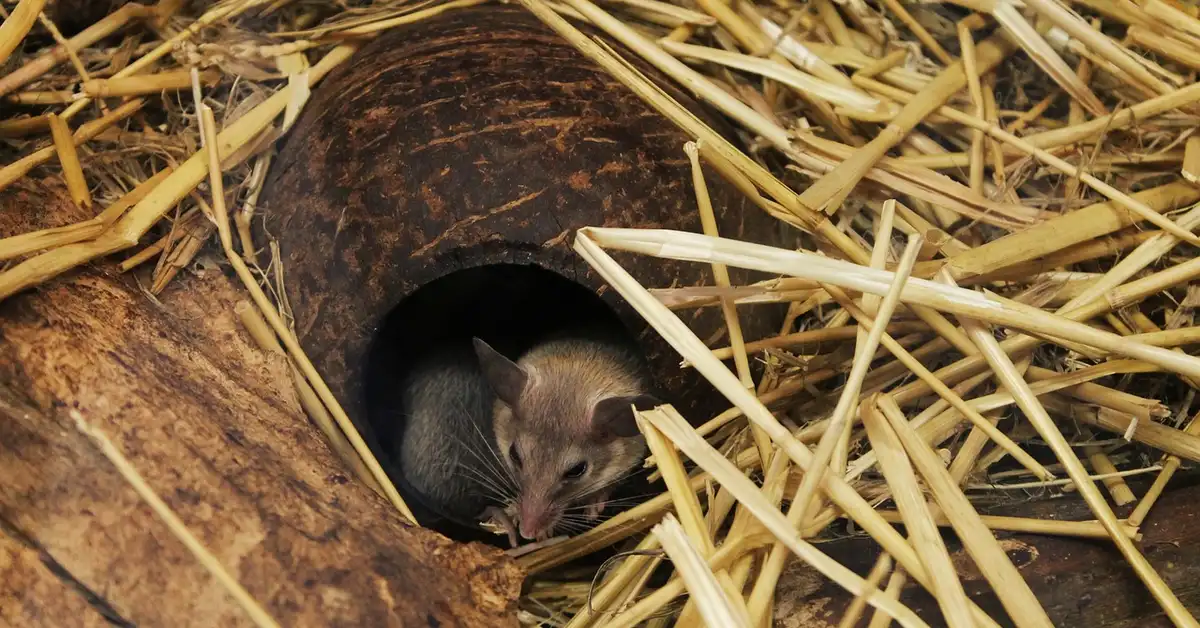
Adjusting your camera settings can make the difference between a blurry mess and a crisp video of your mouse’s antics. Start by setting a fast shutter speed-around 1/250 second or higher-to freeze those rapid scurries and jumps. Mice like my curious Kenny move in unpredictable bursts, so a higher shutter speed ensures you catch every detail without motion blur.
Keep your ISO as low as possible to reduce graininess, but don’t be afraid to bump it up in dim lighting to maintain clarity. Opening the aperture wide (like f/2.8 or lower) lets in more light and creates a lovely soft background that keeps your mouse in sharp focus. I’ve found that using manual focus or a continuous autofocus mode helps track their quick direction changes, giving you smoother, more professional-looking footage.
- Shutter speed: 1/250 sec or faster to stop motion
- Aperture: f/2.8 or wider for better light and bokeh
- ISO: Low (100-400) in bright light, up to 1600 if needed
- Focus mode: Continuous or manual for tracking movement
Smartphone vs. Camera: What You Actually Need
You might wonder if a fancy camera is necessary, but many smartphones today are perfectly capable for mouse filming. Modern phone cameras offer excellent video quality and are super convenient for quick, spontaneous captures. I often use my phone for impromptu videos of Jeffery’s cheerful nibbling because it’s always within reach and easy to handle. If you want more control over lighting and backgrounds, consider building a simple miniature photo studio for mice that works great with a smartphone. With a small backdrop and soft, diffuse light you can get charming, well-lit shots without stressing your pet.
Dedicated cameras, like DSLRs or mirrorless models, give you more control over settings and better low-light performance. If you plan to film frequently or want higher-quality close-ups, investing in a camera with a good macro lens can be worthwhile. For most pet owners, though, a smartphone with a stable holder and some basic apps for manual controls will do the job beautifully without breaking the bank. When photographing fast-moving pets, prioritize a fast shutter speed, continuous autofocus and a high burst rate to freeze the action. Also use a wide aperture and raise ISO as needed to maintain proper exposure without motion blur.
- Smartphones: Great for ease, portability, and quick shots
- Dedicated cameras: Better for advanced settings and detail
- Consider your budget and how often you’ll film
Step-by-Step Filming Techniques for Mouse Behaviors
Getting Steady, Sharp Footage of Fast-Moving Mice
Mice are lightning-fast, so keeping your camera steady is key to avoiding shaky videos. Use a small tripod or rest your camera on a stable surface to eliminate hand tremors and capture smooth, watchable clips. I’ve filmed Gregory’s calm explorations this way, and it makes his deliberate movements look even more graceful on screen.
Anticipate your mouse’s path by observing their favorite routes in the enclosure. Position your camera at a slight angle to their common trails, and use burst mode or high frame rate video to increase your chances of catching action moments. This approach helps you record natural behaviors without missing a beat, whether it’s a quick dash or a playful leap. Review your footage to spot grooming habits, coat condition, or stress signals, and use those insights to plan gentle taming and targeted grooming sessions. Those observations are especially useful when preparing your mouse for shows, so you can address any issues and present them at their best.
- Set up your camera on a tripod or flat surface
- Observe mouse patterns to predict movement
- Use burst mode or 60fps video for clarity
- Review footage to adjust angles for next time
Capturing Close-Up Details Without Disturbing Your Mouse
Getting up close without startling your mouse requires patience and the right approach. Move slowly and avoid sudden noises to let your mouse acclimate to the camera’s presence over several sessions. I’ve had success with Jeffery by gradually introducing the camera during his calm moments, which helped him stay relaxed for detailed shots of his whiskers and paws. These are the same slow, positive steps covered in the complete guide to taming a scared, skittish mouse. With gradual exposure, treats, and patience you can build the trust needed for close handling and photos.
Opt for a zoom lens or your phone’s digital zoom, but be mindful not to invade their space too abruptly. Filming from outside the enclosure with a lens that has good close-focus capabilities allows you to capture intimate details like grooming or eating without causing stress. This method preserves their natural behavior and results in more authentic, engaging videos.
- Approach gradually to build trust
- Use zoom features from a distance
- Film during quiet, active times
- Avoid direct light or loud sounds
Using Treats and Enrichment to Encourage Natural Behaviors
Treats and toys can coax out those adorable behaviors that make for great video content. Place small, high-value treats like sunflower seeds or berry crumbs in visible spots to prompt foraging and interaction. Kenny’s bold nature means he’ll often investigate new items quickly, giving me perfect opportunities to film his exploratory antics.
Incorporate enrichment items like tunnels, wheels, or paper tubes to stimulate natural play. Rotating toys regularly keeps your mice curious and active, leading to more dynamic footage of climbing, digging, and social behaviors. I’ve noticed that Gregory enjoys aged cheese placed on a platform, which encourages him to climb and nibble in a way that’s perfect for filming. To keep your mouse entertained beyond the wheel, try adding sensory and foraging options like chew blocks, hideouts, and puzzle feeders. These alternatives promote natural behaviors and make for even more engaging footage.
- Select treats your mouse loves
- Introduce new enrichment items slowly
- Film during peak activity times
- Observe and adjust based on their reactions
Recording Sound and Managing Background Noise
Capturing the subtle sounds of your mouse can add a rich layer to your videos, but background noise often gets in the way. Use an external microphone or your device’s built-in mic with a windscreen to minimize rustling and focus on those tiny squeaks and scratches. I’ve recorded Jeffery’s soft, nervous chirps this way, and it makes the footage feel more immersive and personal.
Choose a quiet time of day for filming, and turn off appliances like fans or TVs to reduce interference. Position the microphone close to the enclosure but out of sight to pick up clear audio without distracting your mouse. This simple step helps you capture the charming sounds of their daily life, from nibbling to playful scuffles, without unwanted noise.
- External mics improve sound quality
- Film in quiet environments
- Place mics near but not in the action
- Edit out background noise in post if needed
Troubleshooting Common Mouse Filming Problems
When Your Mouse Won’t Cooperate on Camera
Mice have their own tiny agendas, and sometimes filming just isn’t on it. Patience and a positive environment are your greatest allies when your mouse seems camera-shy. When photographing pet mice, give them a moment to investigate the camera and reward curious behavior with a small treat. If your pet is hiding or avoiding the lens, resist the urge to chase or reposition them forcefully. I’ve noticed my mouse Kenny, with his impulsive nature, often needs a few minutes to investigate the camera on his own terms before he relaxes.
Try these gentle strategies to encourage cooperation:
- Place a favorite treat, like a sunflower seed, near the camera to build positive associations.
- Film during their active hours, typically in the evening or early morning.
- Use a soft, familiar voice to reassure them while you set up.
- Keep filming sessions short-under ten minutes-to prevent stress.
Fixing Focus and Blur in Fast Action Shots
Mice are lightning-fast, and capturing their quick movements can be a real challenge. Adjusting your camera’s settings is the key to freezing those energetic moments without a blurry mess. A high shutter speed, like 1/250th of a second or faster, will help you catch every twist and turn. If your camera has a continuous autofocus mode, use it to track your mouse as they move. Also use only safe, non-toxic props and secure the set to prevent escapes or chewing hazards. This guide will show how to choose and arrange props for a calm, safe mouse photoshoot.
Here are practical steps to improve your action shots:
- Increase your ISO setting in lower light, but be mindful of graininess.
- Use a tripod to stabilize your camera and reduce shake.
- Pre-focus on a spot where your mouse often plays, like their wheel or a tunnel entrance.
- Film in well-lit areas to allow for faster shutter speeds naturally.
Basic Editing to Make Your Mouse Videos Shine
Selecting and Arranging Your Best Clips
Sorting through your footage might feel overwhelming, but it’s where your mouse’s personality truly comes to life. Look for clips that tell a story, whether it’s a curious sniff or a playful climb. I often start by grouping similar behaviors together, like all of Jeffrey’s gentle nibbling on berries, to create a cohesive sequence. Delete any shaky or poorly lit shots right away to keep your project tidy.
Follow this simple process for a smooth edit:
- Watch all your clips and mark your favorites with a star or note.
- Arrange them in an order that builds interest, such as starting calm and building to action.
- Trim the beginnings and ends of clips to remove empty or boring moments.
- Use quick cuts between clips to maintain a lively pace that matches your mouse’s energy.
Adding Slow Motion and Time-Lapse Effects
These effects can transform ordinary mouse antics into something magical. Slow motion is perfect for highlighting intricate behaviors, like grooming or delicate paw movements. Time-lapse works wonders for showing longer activities, such as nest-building or exploring their habitat over hours. Most basic editing apps, like iMovie or Shotcut, have these features built-in and easy to use.
Apply these effects thoughtfully for the best results:
- Use slow motion at 50-75% speed to appreciate details without losing the natural flow.
- Set up time-lapse by securing your camera and filming at intervals, like one frame every few seconds.
- Pair these effects with gentle background music to enhance the mood without startling your mouse.
- Avoid overusing them; pick one or two key moments per video to keep it engaging.
Keeping Your Mouse Safe and Comfortable While Filming
Your mouse’s well-being should always come before getting the perfect shot. Always monitor your pet for signs of stress, like excessive grooming or hiding, and stop filming immediately if you see them. Ensure their habitat remains a safe space by avoiding loud noises or sudden movements near the camera. I make sure my mice, like calm Gregory, have access to their favorite hideouts and fresh water throughout any session. Normal grooming is fine, but constant licking, fur loss, or bald patches can signal stress or a skin issue. For more information on grooming behaviors that indicate a problem, check out this article on grooming habits. If you notice those signs, pause and give your mouse a quiet break so they can calm down and recover.
Follow these guidelines to prioritize your mouse’s comfort:
- Keep the filming area at a comfortable temperature, away from drafts or direct heat.
- Use natural or soft, diffused lighting instead of harsh, bright lights that can cause discomfort.
- Take regular breaks to let your mouse rest and behave normally without pressure.
- Never force your mouse into positions or actions; let their natural curiosity guide the footage.
Frequently Asked Questions
How do I capture mouse behavior on Mac?
To record your pet mouse’s actions on a Mac, use built-in software like QuickTime Player or third-party apps such as OBS Studio for more advanced features. Connect your camera via USB or use your Mac’s webcam, then position it steadily near the enclosure to film natural behaviors without disturbing your mouse. Adjust settings like resolution and frame rate to match your needs, and ensure adequate lighting to avoid grainy footage, just as you would with any camera setup.
How do I capture mouse behavioral adaptation?
Filming behavioral adaptation involves observing how your mouse adjusts to changes over time, such as new toys or habitat layouts. Record short sessions daily to document their gradual comfort with novelties, like exploring a rearranged space or interacting with unfamiliar objects. This approach helps you capture authentic reactions and long-term adjustments, providing insight into their resilience and personality without stressing them.
How do I capture mouse behavior with a tracker?
Using a motion tracker, like software that analyzes movement patterns, can help quantify your mouse’s activity levels and behaviors. Set up a camera to record their actions in a consistent, well-lit environment, and use tracking tools to monitor metrics such as distance traveled or time spent in specific areas. This method is ideal for pet owners interested in detailed behavioral data, but always prioritize your mouse’s comfort by avoiding invasive setups.
Your Path Forward
Patience and a keen eye will always yield the most charming and authentic footage of your tiny companion. Focus on short, frequent sessions, use natural light when you can, and let your mouse’s own curiosity guide the scene.
Ultimately, these videos become priceless memories that celebrate the unique personality of your pet. Every whisker twitch and playful hop you capture is a testament to the special bond you share, a digital scrapbook of tiny, joyful moments.
Further Reading & Sources
- The Mouse Action Recognition System (MARS) software pipeline for automated analysis of social behaviors in mice – PMC
- An 8-cage imaging system for automated analyses of mouse behavior | Scientific Reports
- A Survey on AI-Driven Mouse Behavior Analysis Applications and Solutions – PMC
Isabella is a passionate small pet enthusiast with over 8 years of experience in caring for mice. She loves sharing practical tips and heartfelt stories to help fellow mouse owners provide the best care for their tiny companions.
Training Techniques